Tuesday, May 15, 2007

Natural Bridge Wildlife Ranch

Waaaaay back in March we went on a safari...outside San Antonio. Natural Bridge Wildlife Ranch is a huge game preserve where you drive along a road that meanders through various habitats looking at animals you don't normally see in Central Texas.

You can also buy bags of high-protein/carb alfalfa pellets to toss out for a lot of the animals to ignore. Seriously, what's up with all the animals eating before we got there? I guess that's what you get when you're at the back of a parade of cars all feeding the animals out the windows.

I think the most exotic animals we saw were some strange deer-like things with what looked like fuzzy, thick horns. Whoops! I forgot that picture. The most rewarding time was actually feeding a giraffe by hand, and letting our boys feed it too - definitely not an everyday occurrence.


Once you go through the vehicle tour you end up back at the beginning of the reserve where you can get out and eat, visit the aforementioned giraffe area and see a selection of birds, monkeys and a goat petting zoo area. We brought quite a bit of the food back with us to this area, but the goats were more interested in the paper bags than the food itself!

Friday, May 04, 2007

Model Fight: Maison de Roulement 003

I've been fiddling with the wheel and tire design. I admit that having a traditional inflatable-style wheel borders on the ridiculous for holding up something this heavy, but in the Bizarro World, tire roll on building.


I Photoshopped two layered renderings to show the wireframe - with SketchUp's default rendering it's hard to see the curvature.

Thursday, May 03, 2007

Model Fight: Maison de Roulement 002

I'm working on a window treatment and some artsy effects around the edges.


I was going to put in a scale Letterman Digital Arts Center, but I can't find the model anywhere.

Tuesday, May 01, 2007

Model Fight: Maison de Roulement

I've been thinking about something for the past couple of days. I've had an image in my head about a huge apartment building that's wheeled and rolls around certain places.


I've also been thinking of some backstory to it as well as some ongoing stories about the adventures that some of the residents will have. Who knows, this might turn into a longer project? I just have to make sure I keep it different from the Crimson Permanent Assurance building in Monty Python's The Meaning of Life.

Thursday, April 26, 2007

Kickstarting Model Fight

I'm trying to get my creativity going again with the Model Fight. I got to a place where I felt like stopping on the factory, but I couldn't leave it alone in my head.

My first idea was to go as fast as I can, just to get some work on paper (pixels?). I even had a cool title - 24 Robots in 24 Hours. The gist was to work quickly going in with the expectation that I wouldn't have a finished project at the end, or even 24 finished projects! I would go for an hour, stop and move on to the next one. I got the idea for faster-paced work from places like National Novel Writing Month, the Three Day Novel Contest as well as other timed creative events.

At the end, I could revisit all 24 models and pick ones to develop further. This "rushed creativity" with ridiculous deadlines isn't new, and it's not the best way to work, but the goal is usually to spark something in your head or get you in a more creative spot.

I worked on my first model for about 20 minutes yesterday, and I didn't like where it was going. But it did give me an idea that I'd like to flesh out...or do I mean steel? Puns-a-flying! Maybe it's already a success?

Tuesday, April 24, 2007

Either I just accidentally dropped some acid, or we're watching a Disney movie!

We have a regular movie night on Fridays where we order pizza and eat in the living room. Thanks to Netflix we have queued up family/kid movies to always be here. I'm not Leander's biggest Disney fan, but you can't go wrong picking some classic Disney fare for the kids, right?

Uhhh, not so fast.

Dumbo was the latest offering. You can tell that it's from a long time ago (1941) by the tone of the dialogue - not that family friendly and antagonistic.

But that's not what raised my eyebrows.


Dumbo apparently has a dream sequence brought on by...something, perhaps the titular acid? Forgive me for not taking better notes - we were travelling and it was on in the van. Some of this stuff is pretty out there.


I'm pretty sure I watched Dumbo when I was younger, but I don't remember any of this.

Apparently there's an elephant that shops at Pottery Barn too!

Thursday, April 19, 2007

My plan for World Dom...I mean High Definition

I've been wanting to jump on the High Definition bandwagon for a while, more for watching movies than anything else.

As to the competing formats, HD DVD and Blu-Ray, I'd be happy with either one if I knew every movie was going to come out on both. As it turns out, at least for now, there are some titles that I want exclusive to each one of the formats. I'm going to go out on a limb here, but I think eventually Blu-Ray is going to win, but it's going to be a long time. In the meantime I need to figure out how to get both....

I think I just got approval from the CFO to get an Xbox 360 + HD Drive. I should probably get it before she reads this.... Why the 360 and not the PS3? I know more people with the 360.

That's basically it.

I know I'm going to be happy with either High Definition video format. I'm getting ahead of myself with my blog posts, but I've seen examples of both, and Daddy likes!

I don't have all the time in the world to play games. Xbox Live is very nice, and I like having the opportunity to play with my friends when I get a chance.

But what do I do about Blu-Ray movies? The answer came to me a few days ago. I'll build a computer with a Blu-Ray drive and connect it via HDMI or DVI to the TV! The 360 covers the HD DVD angle.

Bada bing! Both formats. Thank you, Cleveland. Good night.

I put a preliminary system together today, and it worked like a charm. I have to figure out the best place to put it, as the Wife Acceptance Factor is both critical and slippery to grasp. A regular desktop stuck next to the TV has a low WAF, so I need to figure out how to shoehorn the components into a small form factor chassis, or at least one that is similar to my home theater components.

Definitely more to come.

Saturday, April 14, 2007

Full sized images posted...FINALLY!!!

I've complained about images I post to my blog not being clickable, that is, clicking on them did not link to the original/higher resolution images.

I've been searching Blogger help files, help forums and sending email to Blogger with no response. I checked other blogs on Blogger and their images don't seem to suffer this same fate.

I checked the HTML of my posts and I couldn't see any alternate upload paths for the high resolution image...it's like my blog lost the functionality to upload fullsize images.

Blogger lets you work in a WYSIWYG environment or an environment that displays all the HTML code. In the WYSIWYG environment, you can drag uploaded images around to the correct spot and the layout code was smart enough to make everything how you want it.

Well, almost how you want it.

It turns out that moving an image in the WYSIWYG space gets rid of the original resolution code (image name, path, pixel count, etc) that is in the HTML. It just disappears. All that is left is the code for the thumbnail image.

I stumbled on to this while flipping back and forth between the an older post that still had clickable links to full size images and a recent post.

Why does this happen? I can find no other reason besides it being a bug.

If you go to the HTML environment you are able to cut and paste ALL the image-related HTML code to another place in your post, and everything goes with it. I've reuploaded the image to the post below and it works like a champ.

I'm relieved that I've found the solution, to say the least. Am I going to go back and fix everything? Probably not.

Friday, April 13, 2007

Not that there's anything wrong with my blog....

I just previewed my blog after posting the Snipping Tool entry, and I happen to check out the Ads by Google area.


Thanks, Google.

What's up with Vista Enterprise?

I've been on Vista Enterprise on my corporate laptop for a while, and a friend just got Vista Ultimate, so he's going through and finding some cool Vista tidbits.


One of them is the Snipping Tool, which looked to be in Vista Home Premium, Business, and Ultimate, but not Home Basic nor Enterprise, or so I thought. My initial reaction was confusion, as I thought Vista Enterprise was to Business as Ultimate was to Home Premium.

I mean, (performance wise) the bits are the same - the features are what define the edition.

I use the tried-and-true Alt-Prnt Scrn for screenshots/dialog captures, so I was slightly disappointed that my system didn't have what sounded like a cool program.

After some poking around, it turns out that Enterprise DOES support the Snipping Tool. As pointed out by Spaghetti, the Snipping Tool falls under Tablet PC Support, which defaults to disabled in Vista Enterprise.


After checking the box and a few moments of configuring...make that a few minutes of configuring...I'm golden! I'll definitely be using this.

But why wasn't it enabled by default? I would think that "Enterprise users" would want more productivity-increasers and would be savvy enough to not be overwhelmed by feature inundation, but who knows.

Monday, April 09, 2007

Gifted and Talented

We moved our kindergartner out of a private school and into public school with some trepidation. I'm a product of both private and public schools, and our assumption was that we (and our son) would get more out of a private school.

We quickly learned the opposite.

After enrolling in our subdivision's elementary school (Leander ISD) we found that the kindergarten teacher our son has is amazing. Any doubt as to the quality of the education from her quickly dissipated. But could kindergarten keep up with our son?

LISD and our school has a Gifted and Talented program, and something called QUEST. At this level, QUEST focuses on creativity, critical thinking, observation, etc. We went through the application process, filled out questionnaires, the school interviewed our son, and finally we heard that he had been accepted into QUEST! Shazam!

His first project is researching a particular insect (he chose honeybees) and working on making his insect out of craft materials for a QUEST fair later this year.

Housekeeping

It looks like more than a month has gone by - time for blogging!

Fixed wishlist.
Fixed movielist.
Removed musiclist.

Tuesday, March 06, 2007

Model Fight update 10...the end?

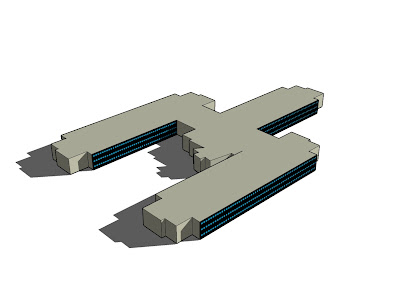
So our Model Fight kind of ran in to the weeds. I finished most of the exterior of the building I was going for, and here it is.


I'm going to give this project a rest and start another. It will have something to do with robots, of course.

Wednesday, February 28, 2007

A .dream come true!

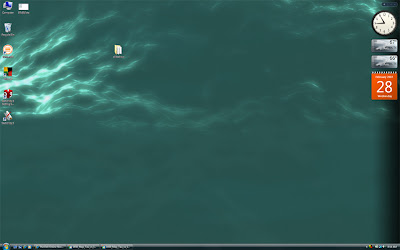
I have a laptop running Vista Ultimate, and I recently found out about Windows DreamScene. It basically allows you to have mpg or wmv files as your Vista background.

Here is a static shot of mine. Just imagine the plasma wave gently undulating as I do work.
The software for this comes in three parts.
  1. An update to Windows Vista Ultimate - Windows DreamScene.
  2. Stardock Deskscapes - a free download. This extends dreamscape files (.dream) to add dynamic content, changes over time, etc.
  3. Stardock DreamMaker - another free download. This allows you to create the actual .dream file and share them.

I already have some ideas for making some .dream files - basically animate some 3d content I already have for a quick test. This could definitely be an attention-grabber for systems at stores, kiosks, tradeshows, etc. Stardock has provided six free .dream files, and they are charging a few bucks for another one.

Go to WinCustomize for more .dream files, downloading the software or picking up some user-generated content.

Friday, February 23, 2007

Six Degrees of Freedom!

Yesterday I emailed my manager to see if I could purchase the 3DConnexion SpaceNavigator, a six degrees of freedom (6DOF) controller for 3D applications. I've used 6DOF controllers for a long time, and I love them. Also, at $59, the SpaceNavigator is A SCREAMING DEAL!

An hour or so later my manager stops by my desk and hands me a box - a SpaceExplorer! Very nice!

Uh oh - I'm running Vista. Will it work? I notice that there are Vista drivers on the website. After a quick download and installation it works like a champ in SketchUp. I also was able to load SolidWorks on my system yesterday, so I'll give that a shot.

$59 is truly a bargain for a great piece of hardware. Definitely recommended if you use CAD or DCC applications, Google Earth...even a Mac!

Syd Mead


I'm a big Syd Mead fan, and I just found a new (to me) website with some of his work - The Syd Mead Project. I've always liked his retro-futuristic designs, and I love his cars.


Enjoy!

Too...Many...Books!

Wow. Yesterday I added a bunch of books that I wanted to a List (Blogger Page Element) and I guess I didn't realize how many books I wanted. Now I have a huge list on the right that pushes my other Lists down into nigh obscurity.

I'll switch those over to a Froogle Wishlist, which Blogger can accomodate easily, but I believe it is only in my Profile. I started a Wishlist but never did much with it. I wanted to add these books to my blog so I could access the list from anywhere (current softcopy of the list is on my work PC).

Wednesday, February 14, 2007

The Poor Man's Guitar Hero


I tried out a new program this morning - Frets on Fire. It's basically Guitar Hero with a keyboard instead of the guitar controller.


It's pretty fun, and I got a few more people interested in it today. It comes with three songs, but it can also import Guitar Hero tracks from the game DVD. Very nice!

Messing around with this definitely makes me want to get the real Guitar Hero (and Guitar Hero 2) for the controller and extra features (encore, crowd, meters, etc), and dismantle a keyboard to make my own guitar controller.

Frets on Fire is definitely fun, and a great way to show off your hot licks at the office.

Monday, February 12, 2007

New OS version

If towns around Odessa, TX, wanted to use the new Microsoft OS, as advertised in Friday Night Lights, would they use Vista Permian?

Friday, January 26, 2007

On Vista and Tags

A feature within Vista that I was really looking forward to using is Tags (sorry for the lame link - scroll down to the bottom). Tags are basically quick labels for files that one can use for organization or searching. They are already used by websites and blogging software (my blog calls them "Labels").

I thought this would be great - I could tag all my patent documents and graphics with "patent" and then I could always quickly find what I need to be working on or saved data.

Tagging is done within the Explorer in a pane below the folder, like this.


Clicking on the box after "Tags:" prompts you to select an existing tag or create your own. So far so good.

The more I played around with Tags, though, the less useful they seemed. Apparently you can't tag everything. Tag-supported files include Office files and image files - these are the ones I've tested so far. No tag support for .txt or .rtf files. Wha wha wha? I prefer to do quick documents in Textpad, not Word, so most of my quick work is untaggable.

While that's not a dealbreaker, it's a little disappointing.

I was also planning on using Tags to help me organize all my data, especially with patent files, benchmark results, etc. The more I thought about it I realized it wasn't exactly like I had wanted.

For instance, I put all patent work in a folder, \patents, with subfolders for specific projects or topics. What would be the point of me tagging all my graphics with "patent" if they are already organized in patent folders? If I needed them, I already know where they are. I'm going to have to tag with subtopics, but the files should already be in subfolders, theoretically already "tagged" by placement.

I could definitely see the benefit of being able to search for all benchmark results for AMD X2 5000+ processors (tagged as AMD, 5000, etc), but since I've done a lot of work on pre-Vista/pre-tag-enabled systems, I've named my result files with specific details in the filename to help with sending them to the correct people.

A plus for Tags is group-tagging. If I didn't want to go through and rename all my vacation photos from IMG0001 - IMG4165 to discrete names I could just select all of them and tag them "Seattle, June 2006" and move on to the next batch. I like that.

I guess it comes down to your preference - do you want to organize by folders and filenames, or by Tags? Or am I missing something? How would you use Tags, and do you think they have a benefit over foldername/filename organization?